GEO for developers: what gets cited by ChatGPT and Perplexity
GEO (generative engine optimization) is how you structure and publish content so AI chatbots and answer engines quote your pages when someone asks a question.…
BLOG
Product updates, engineering deep dives and notes from the field — written by people who actually ship the code.
Subscribe and get one new post about code, design and shipping — straight to your inbox. No filler, no growth hacks.
You're almost in. Check your inbox to confirm.
No spam. Unsubscribe anytime.
AI FOUNDATIONS
LLM, model, agent, and subagent mean different things. Comparison tables map the hierarchy, tool use, workflows, and when a fixed plan beats an agent.
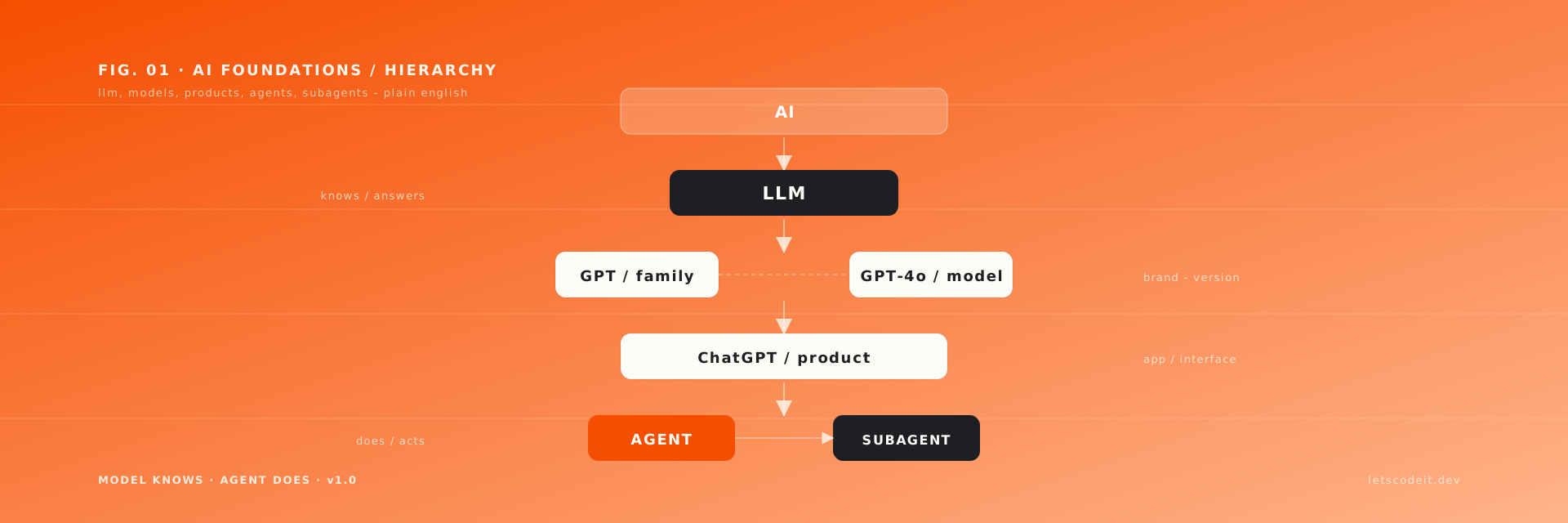
FIG. 01 ·AI Foundations — May 20, 2026
An LLM is a text predictor: you send words in, it predicts the next token until the reply is done. An agent wraps that same model with tools and a plan so it can search, write files, or call APIs. A subagent is a helper agent spun up by another agent for one slice of a bigger job. Same stack, different layers.
If you've ever opened an article about AI and felt like everyone else is speaking a different language, you're not alone. People swap "LLM," "model," "ChatGPT," and "agent" like synonyms. They aren't. This post maps the vocabulary and hierarchy. Prompts, context, skills, plus MCP get a short pass here; isolated definitions of other terms live in the AI and LLM glossary.
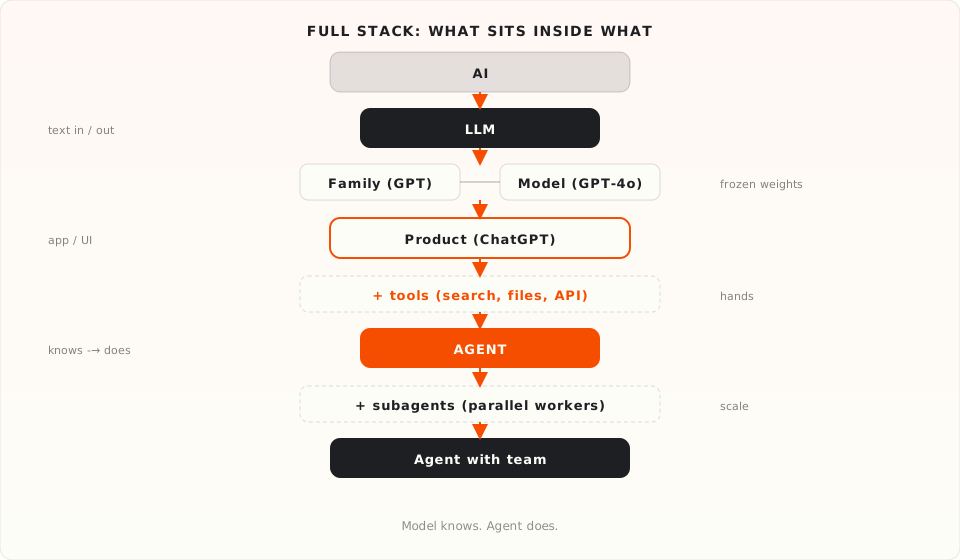
An LLM (Large Language Model) is a neural network trained on huge amounts of text. You give it text as input. It predicts the next word, again and again, until it has a full answer: a chat reply, code, a translation, a summary.
An LLM doesn't "understand" language like a human and doesn't "recognize" speech (voice uses other systems). It continues a phrase the way similar phrases appeared in training data. Language means text. Large means scale (billions of parameters).
How is an LLM different from "just AI"?
AI is any system that does tasks that used to need a human.
LLM is one kind of those systems: built for text (and anything you can turn into text: code, JSON, prompts).
| "Just AI" | LLM |
|---|---|
| Recognizes faces in photos | Generates and extends text |
| Filters spam in email | Answers in chat |
| Recommends movies | Writes code from a description |
| Runs a warehouse robot | Summarizes a document |
Common mistake. ChatGPT is a product (an application). GPT-4o is a model inside it. "Ask ChatGPT" means you're using a product, not a "bare" model in a vacuum.
GPT, Claude, Llama, Gemini, Kimi, DeepSeek, Qwen are not individual models. They're family names (product lines). Like "iPhone" at Apple: the word alone doesn't tell you if it's a Pro or an SE.
Family examples: GPT (OpenAI), Claude (Anthropic), Llama (Meta), plus Gemini, Kimi, DeepSeek, Qwen.
A specific model is a checkpoint after training: fixed weights for that release, with a known size and version name. The math doesn't change until someone trains and ships a new version.
What you use day to day is often different. ChatGPT, Claude.ai, and other AI products may swap which checkpoint they route to, add tools, or change the system prompt, even when the marketing name stays the same. For production APIs, many providers let you pin a snapshot (e.g. gpt-4o-2024-08-06) so behavior stays closer to what you tested.
Examples: GPT-4o, o1 · Claude Opus 4.6, Sonnet 4.6, Haiku 4.5 · Llama 3.1 70B · and counterparts from Gemini, DeepSeek, Qwen.
Inside the Claude family there are three tiers:
Opus 4.6 and Sonnet 4.6 are different models: different weights, different speed, different price.
ChatGPT, Claude Code, GitHub Copilot are products: applications that use models inside them.
Analogy. The model is the CPU. The product is the OS. You work in the OS. The processor underneath isn't something you see or configure. Claude Code is a different OS from ChatGPT. It might use the same CPU (GPT-4o, Claude Sonnet 4.6) with a different interface and features.
Common mistake. ChatGPT won't edit files in your local project by itself. The browser product has no access until you grant it (uploads and connectors are different; still not the same as an agent working in your repo). Expecting "chat in the browser" to act on your machine means confusing a product with an agent.
In ChatGPT with search enabled: "Research competitors and write a report." You get text in the chat, often with up-to-date data. There is no
report.mdon disk. The product replied, but didn't touch your system.
When you type "find the weather" in ChatGPT, it feels like ChatGPT went on the internet. Behind one window there are several layers:
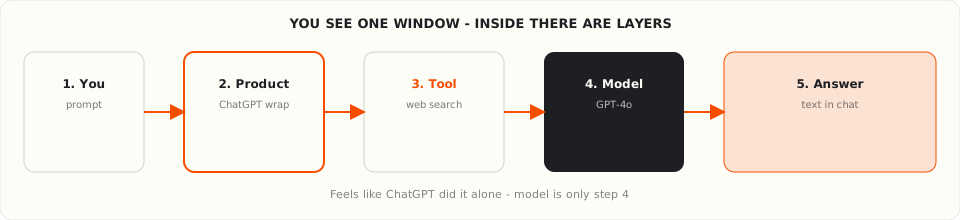
The model is only one step. Same logic for a competitor report: finished text in the chat, but inside the product runs search first, then the model words the answer.
A model is a text predictor. You give text. It continues. It doesn't "think" or "decide" in the human sense.
On its own, a model cannot open a browser, write to your disk, send an email, or run your code. I kept expecting it to "just do it" early on, until I realized I was confusing the model with the agent wrapped around it. Tools and agents handle that.
Ask an LLM in chat only, with no search or files, to "research competitors…" and you get a plan, tips, a report template. No real prices or live sites "as of today" unless tools are wired in.
A prompt is any text you send the model: a question, a task, a chunk of code.
"Write code" is weak. "Write a Python function that takes a list of numbers and returns only the even ones" is clear.
A system prompt is a hidden instruction for the whole conversation. You usually don't see it; the product sets it.
Same model, same question "How do I solve 5x + 2 = 3?":
ChatGPT, Claude Code, GitHub Copilot: each has its own system prompt (helpful assistant, code, files).
Prompt engineering isn't "spells." It's steadily improving how you phrase the task.
Example: job posting.
Weak:
Write a job posting for a developer.
Better:
Write a job description for a senior Python developer.
Company: fintech startup, 50 people.
Stack: Python, FastAPI, PostgreSQL, Docker.
Terms: remote, salary range $120k–$180k USD.

Include: company overview, requirements, responsibilities, benefits, how to apply.
The first line matters a lot. Prefer a direct instruction, not a hint. Skip "I was reading about Redis…" and write "Name three companies that use Redis in production and what they use it for."
Weak: "Write a report on competitors." Better: "Research 5 direct competitors in niche X. Table: name, pricing, key features. Then 2 paragraphs of takeaways. Markdown format."
Deeper techniques (prompt markup, in-prompt examples, evaluation on datasets) belong in separate posts; the loop above is enough to start.
A tool (tool use) is a function the model asks to invoke; your app or service actually runs it.
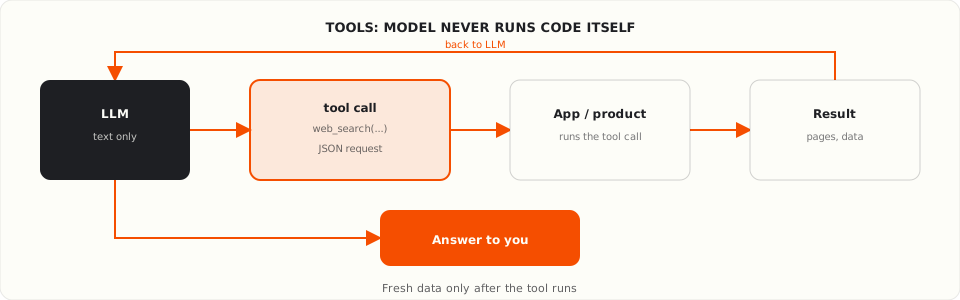
The model doesn't hit your database or disk by itself. It returns something like: "call web_search with these parameters" → the program runs it → the result goes back to the model → the model answers you.
When you need tools: fresh data (weather, prices), actions with side effects (email, files, APIs), your private database.
When you don't: general knowledge, translation, a one-off question with no action.
If you're parsing the model's reply with regex to "extract" a fact, you probably needed a tool, not a longer prompt.
For a competitor report, the model may request
web_search→ your app fetches pages → results return to context → the model writes from fresh data. Without a tool, only what was in training.
An agent is software wrapped around a model: the same LLM plus tools and a plan (what to do next, what to call, when to stop).
An agent can search the web, run code, read and write files, call APIs.
The model answers a question. The agent does a task.
Agent = model + tools + planning.
The model knows. The agent acts.
"Research competitors and write a report": the agent picks the steps (search, read sites, compare, save
report.md). You set the goal, not every click.
A subagent is an agent started by another agent for part of a job.
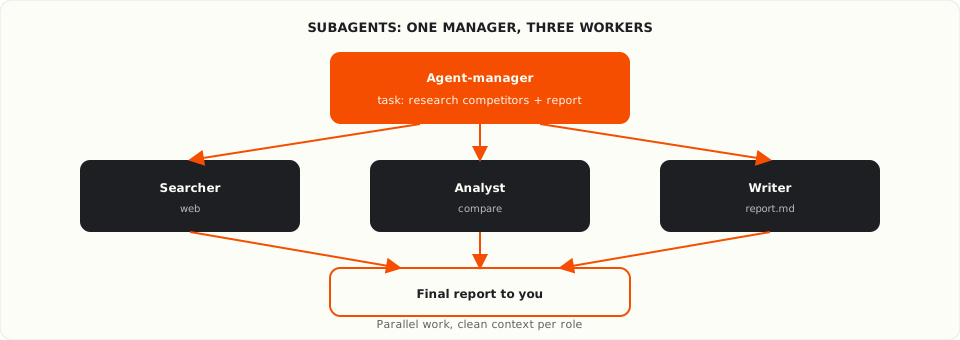
For the same competitor-report task, the manager agent delegates:
The manager assembles the result.
Why: separate roles, parallel work, less noise in each agent's context.
When it's overkill: a one-sentence task ("write a sort function"). One agent, or even plain chat with a model, is enough.
One task ("Research competitors and write a report") looks different at each level:
| Level | What you get |
|---|---|
| Model in chat | Advice and a plan, no live search, no file on your machine |
| Product with built-in search (ChatGPT, etc.) | Report in the chat with fresh data; your repo files stay untouched |
| Your app + tools | You wire web_search, databases, disk; the model requests, your code runs |
| Agent | Search, draft, report.md in your project |
| Agent + subagents | Parallel search and writing; manager merges |
The full hierarchy (beyond this example) is in the diagram at the top.
A workflow is several model calls following a fixed plan. You control every step.
Example: bug screenshot → description → repro steps → completeness check → polish. A "creator + critic" pattern.
An agent gets a goal and tools; the model chooses the order of steps.
Fixed plan: (1) list 5 competitors, (2) price table, (3) conclusion text. Three scripted model calls → workflow. One line "make the report," steps chosen on the fly → agent.
| Workflow | Agent | |
|---|---|---|
| Step plan | Yours upfront | Decided as it goes |
| Control | Maximum | By goal |
| When | Steps are known | Steps are unclear |
Think ChatGPT is the model → you expect actions chat can't do. "Why didn't it update my file?" Because it's a product without disk access.
Think an agent is just a smart chat → you're surprised by odd choices. An agent acts; more capability means more ways to get it wrong. On real projects, that gap between hype and judgment still matters. See why AI won't replace developers for what we actually saw in production.
Confuse agent and subagent → you overcomplicate simple work. Three subagents for one function is too much.
Model. "Write an auth function" → code in the reply → you copy the snippet and test it yourself.
Product (ChatGPT in the browser). Nice back-and-forth; files on disk still don't change on their own.
Agent (Claude Code, GitHub Copilot coding agent in VS Code). "Add auth to my project" → finds files, writes code, checks the build.
Agent + subagents. "Auth plus tests plus docs" → one writes code, another runs tests, a third updates docs; the lead agent checks consistency.
Same model inside. Different experience outside.
| Term | In one line |
|---|---|
| GPT, Claude… | Family name, not a version |
| LLM / model | Text predictor: knows, doesn't act |
| GPT-4o, Sonnet 4.6… | One trained checkpoint (pin versions in APIs) |
| ChatGPT, Claude Code… | Product around a model |
| Agent | Model + tools + plan |
| Subagent | Helper agent for a subtask |
The model knows. The agent acts. Everything else is wrappers, naming, scale.
An LLM predicts text from input. It answers questions and drafts content inside a conversation. An AI agent adds tools (search, files, APIs) and a plan loop so the model can act on your goal, not only reply. Same underlying model; the agent is the wrapper that runs real side effects.
ChatGPT is a product: a web app built around GPT-family models. GPT-4o is a model (a trained checkpoint). When someone says "ask ChatGPT," they mean the product interface, which may route to different model versions and system prompts than a raw API call, with its own tool wiring.
A subagent is an agent spawned by a parent agent to handle one part of a larger task. A manager agent might delegate web search to one subagent and file editing to another, then merge results. Use subagents when roles differ or work can run in parallel; skip them for single-step jobs.
Use a workflow when you already know every step (extract → classify → summarize → format) and want predictable control. Use an agent when the path is unclear and the model should choose tools and order on the fly. Workflows are easier to debug; agents handle messier goals.
These came up while writing and I kept cutting them. Each deserves a full post. Here's just enough to know what they are.
The context window is how much text a model can "hold in mind" in one conversation: your messages, replies, tool results. That's not the same as knowledge from training.
Each model has its own limit (roughly hundreds of pages to very large volumes). Context rot: in long threads the model forgets the middle; don't fill the chat with junk.
Products sometimes compact old messages to free space. Skills load instructions in chunks, also to save context.
A skill is a bundle of instructions and files (often SKILL.md) that turns a general model into a specialist for a narrow job: SQL, your CRM, internal rules.
Unlike a one-off prompt, a skill hooks in automatically when the task fits. It loads in parts, not the whole package into context at once.
MCP (Model Context Protocol) is a standard way to plug in ready-made tools without writing a wrapper for every API.
A tool is what the model can call. MCP is who already built a tool pack for GitHub, databases, the cloud, and so on.
Without MCP you describe every function yourself. With MCP you connect a server and get a bundle of capabilities. To learn MCP hands-on, see the Anthropic Academy courses review (intro and advanced MCP tracks).
If the write → check → refine loop is already familiar, next steps:
In production, prompts are tested on example sets and scored against criteria, not eyeballed once.
More terms: RAG, embeddings, RLHF, fine-tuning, and others, in the AI and LLM glossary.
GEO (generative engine optimization) is how you structure and publish content so AI chatbots and answer engines quote your pages when someone asks a question.…
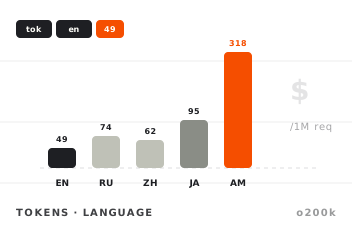
When you send a message to an LLM, you are not paying for characters or words. You pay for tokens . A token is the unit the model splits text into before…
Subscribe and get one new post about code, design and shipping — straight to your inbox. No filler, no growth hacks.
You're almost in. Check your inbox to confirm.
No spam. Unsubscribe anytime.
No comments yet. Be the first to share your thoughts.
Comments