
.gitignore is not enough: how I wiped git history on a public content repo
Adding paths to .gitignore and deleting them in a new commit only removes files from the latest snapshot of your branch. Old commits on GitHub still store…
BLOG
Product updates, engineering deep dives and notes from the field — written by people who actually ship the code.
Subscribe and get one new post about code, design and shipping — straight to your inbox. No filler, no growth hacks.
You're almost in. Check your inbox to confirm.
No spam. Unsubscribe anytime.
ENGINEERING
Use GitHub as your CMS: separate markdown repo, Next.js reader, Cloudflare CDN. Real architecture with comparison tables, trade-offs, setup steps, and FAQ.
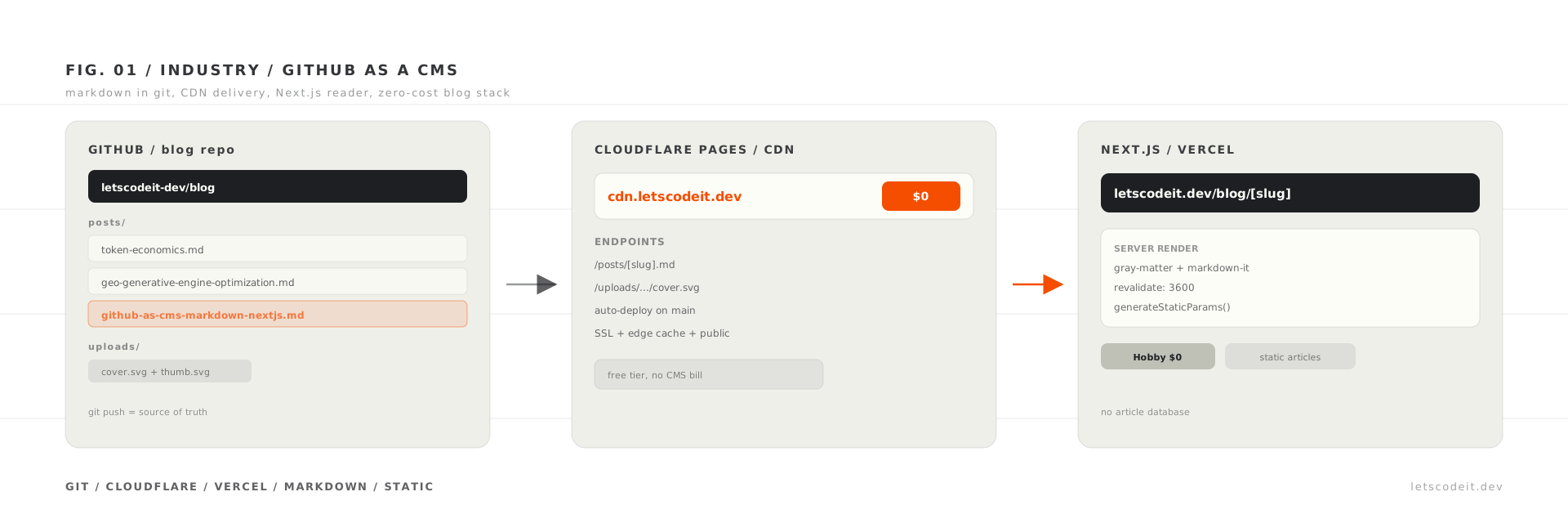
FIG. 01 ·Engineering — June 19, 2026
We publish letscodeit.dev blog posts from a separate GitHub repository. The Next.js app fetches markdown at runtime with a one-hour cache, syncs slug metadata into Postgres on every build, and writes some assets back through the GitHub Contents API. There is no admin UI for long-form articles. Git is the editor.
We have shipped blogs on other projects before. Some were fully custom. Others leaned on ready-made CMS products with their own admin UI, hosting line items, and migration stories we would rather forget. That history made the bar clear for letscodeit.dev: keep it simple, keep it free, and avoid setup that exists only to justify itself.
Headless CMS platforms solve a different problem. They shine when you need relational content, editorial workflows, and preview URLs for non-technical authors. Our blog ships a few long articles per month. YAML frontmatter and a posts/ folder are enough.
The timing helped too. Right now you can spike an architecture quickly with an LLM in the loop. Vibe coding, if you like that label. We sketched alternatives in an afternoon: markdown inside the app repo, markdown in Postgres, a paid headless tier with another dashboard to learn. After a short research pass and a small prototype, the answer was boring in a good way. Put articles in a separate GitHub repository and let the Next.js app read them.
We still wanted versioned markdown, plain diffs, and the freedom to edit in VS Code, Obsidian, or github.dev. That part did not change. What changed was how fast we could rule options out and land on this one.
Short notes on the site live in Postgres. They are tweet-length and change often. Blog posts are the opposite: slower cadence, heavier structure, and a writing flow that already lives in git. Storing that markdown in the application database felt wrong the first time we sketched the schema. We kept a Post model in Prisma early on and never used it for the public blog.
We also did not want every typo fix to require redeploying the entire Next.js app. Runtime fetch from raw GitHub (or our CDN mirror) means content can update on cache expiry without a new app release. Listing pages and APIs still need a stable index of what exists. That is where the build step comes in.
| Repo | Role |
|---|---|
| blog (this repository) | Source of truth: posts/*.md, images under uploads/ |
| letscodeit.dev | Renderer: fetch, parse HTML, SEO metadata, likes keyed by slug |
A post is a file, not a database row. Categories and tags come from frontmatter when the app parses each file. The filename and the public slug can differ. For example, anthropic-academy-courses-review.md publishes at /blog/anthropic-academy-guide-free-ai-courses, and Token Economics lives in token-economics.md with a matching slug. Internal links always use the frontmatter slug, not the filename.
Every article starts with YAML. The site expects at least title, slug, canonical, publishedAt, description, category, tags, status, and image paths.
---
title: "We skipped Contentful: GitHub as a CMS for our Next.js blog"
slug: "github-as-cms-markdown-nextjs"
canonical: "https://letscodeit.dev/blog/github-as-cms-markdown-nextjs"
publishedAt: "2026-06-19"
description: "Use GitHub as your CMS: separate markdown repo, Next.js reader, Cloudflare CDN. Real architecture with comparison tables, trade-offs, setup steps, and FAQ."
category: "Industry"
tags: ["nextjs", "github", "markdown", "cms", "cloudflare", "vercel", "headless-cms", "architecture"]
status: "published"
featured: true
coverImage: "/uploads/github-as-cms-markdown-nextjs/cover.svg"
thumbnail: "/uploads/github-as-cms-markdown-nextjs/thumb.svg"
---
canonical must match https://letscodeit.dev/blog/[slug]. The site uses it for Open Graph, JSON-LD, and share URLs. Only status: "published" posts appear on /blog and in llms.txt. Drafts stay in the repo for review without going public.
Parsing on the app side is deliberately boring: gray-matter for frontmatter, markdown-it for HTML, then small post-processing for heading anchors, table wrappers, and asset URLs. Long guides like our LLM hierarchy explainer use the same pipeline as short opinion pieces.
The read path lives in letscodeit.dev/src/lib/content.ts. At a high level:
blog_post_slugs in Postgres (newest first).posts/ via the GitHub API.CONTENT_REPO_URL/posts/{filename} with revalidate: 3600 and cache tag blog-posts.publishedAt.const res = await fetch(`${contentRepoUrl}/posts/${filename}`, {
next: { revalidate: 3600, tags: ["blog-posts"] },
});
We do not call the GitHub API on every page view. Rate limits and latency add up fast. The slug index is cheap to query. Markdown bodies sit behind unstable_cache for an hour, with React cache() deduplicating work inside a single request.
Default origin is raw.githubusercontent.com/letscodeit-dev/blog/main. Production can point CONTENT_REPO_URL at a CDN mirror instead. Image paths like /uploads/token-economics/cover.svg resolve through resolveBlogAssetUrl() in blog-content-url.ts.
Every npm run build on letscodeit.dev runs scripts/sync-blog-post-slugs.ts. That script:
.md files in posts/ via the GitHub API.blog_post_slugs (slug, filename, status, publishedAt).blog-categories.generated.ts for navigation labels.await tx.blogPostSlug.upsert({
where: { slug: post.slug },
create: { slug: post.slug, filename: post.sourceFilename, status, publishedAt: post.publishedAt },
update: { filename: post.sourceFilename, status, publishedAt: post.publishedAt },
});
Why keep slugs in Postgres if markdown lives on GitHub? Three reasons we hit in practice.
The like API checks isPublishedBlogPostSlug() before incrementing a counter. That should not require downloading every post body. Sitemap generation and category filters can trust the index. An app deploy also pins "what exists right now" even if runtime markdown cache is still warm from an older fetch.
Important nuance: a brand-new published post appears in listings after the next app deploy (when sync runs). Body text can show up sooner if cache allows, but the slug row might be missing until then. We are honest about that lag below.
The first version was the obvious one. We pointed CONTENT_REPO_URL at raw.githubusercontent.com and it worked. Markdown loaded, images resolved, nothing mysterious. It also looked exactly like what it was: raw git hosting. URLs were long, the hostname screamed "implementation detail," and we are vain enough to care about that.
So we added a proper deployment layer. The content repo connects to Cloudflare Workers & Pages: link the GitHub repository, pick a branch, and every push to main redeploys static files automatically. No separate build command for markdown. The repo is the site artifact. Each Pages build finishes in a few seconds for us right now, because there is nothing to compile, only static files to upload.
Fair warning about the dashboard. Cloudflare groups Workers and Pages under one product name, and the UI does not make it obvious that you want a Page (static site from git), not a Worker (serverless script). We clicked the wrong mental model at least once 😆. Here is the path that actually worked for us.
Step 1. Open Workers & Pages in the Cloudflare sidebar, then click Create application.
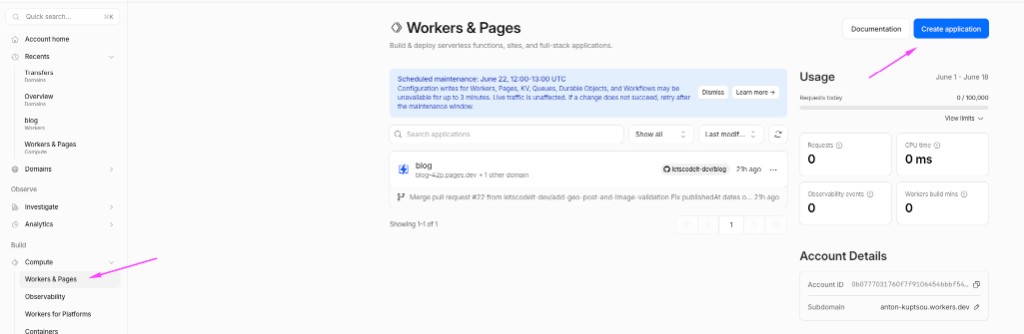
You will land on a screen titled Create a Worker. That is the trap. The big Continue with GitHub button starts a Worker project, not Pages.
Step 2. Scroll to the bottom. Click Looking to deploy Pages? Get started (easy to miss).
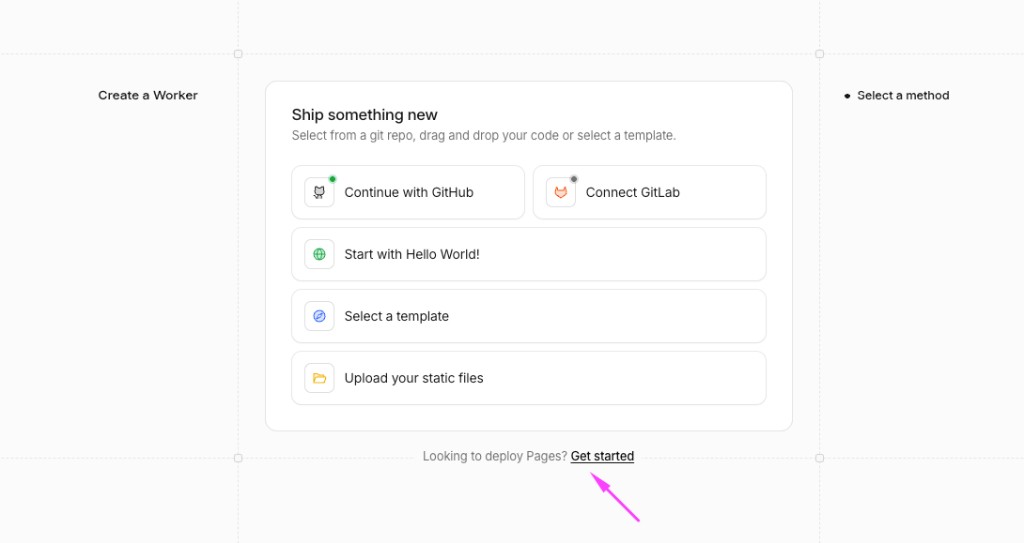
Step 3. On Get started with Pages, choose Import an existing Git repository and click Get started. Authorize Cloudflare on GitHub, pick your content repo (letscodeit-dev/blog in our case), and deploy the main branch. Cloudflare assigns a *.pages.dev hostname on the first successful build.
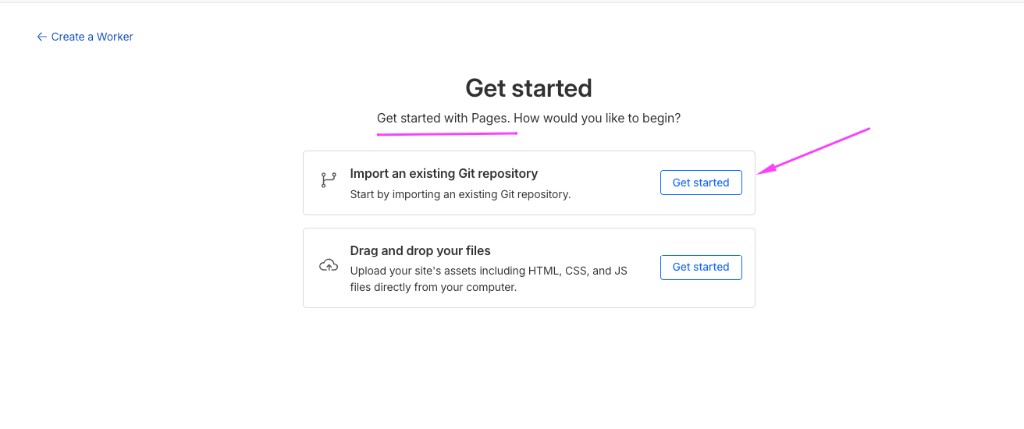
If you get stuck, paste a screenshot into your coding agent and ask which button to hit. That solved it faster than the docs for us.
Step 4. Add a custom domain. Open the project → Custom domains → Set up a custom domain. We use cdn.letscodeit.dev. SSL came up on its own. The root serves a minimal index page ("Content repository for Let's Code It") and everything under /posts/ and /uploads/ is addressable on our own hostname.
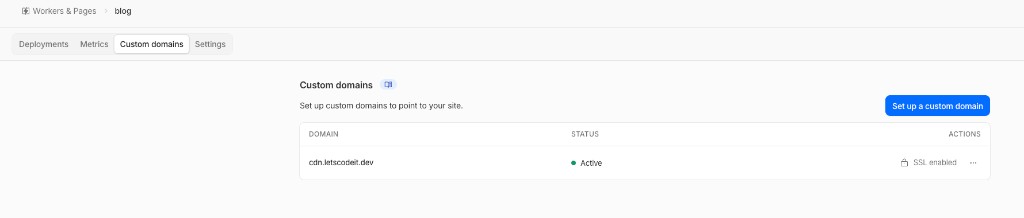
That is the full Cloudflare setup for us. No extra access rules, no build plugins, no cache tricks beyond what Pages gives you for free. Static files in the repo are public on push. Markdown at cdn.letscodeit.dev/posts/[slug].md, images under /uploads/, all reachable without authentication. We want it that way. Crawlers and AI bots should be able to fetch plain content from a clean URL, not fight raw.githubusercontent.com or a dashboard-only origin. If you care about citation in ChatGPT, Perplexity, or Google AI Overviews, public CDN URLs are part of the stack. We wrote up what else matters in our GEO field notes.
Post images never lived on a separate asset host. Covers, thumbnails, and inline figures sit next to markdown under uploads/[post-name]/ in this repository. Frontmatter and body use relative paths that start with /uploads/:
coverImage: "/uploads/token-economics/cover.svg"
thumbnail: "/uploads/token-economics/thumb.svg"

Commit the SVG or PNG, push to main, and Cloudflare deploys it beside the article. The same path works in git, on cdn.letscodeit.dev, and in the Next.js renderer (resolveBlogAssetUrl() prefixes /uploads/... with CONTENT_CDN_URL in production). One folder per post, one path convention, no upload UI for blog art.
Note images from the main site admin land in uploads/notes/ through the GitHub API. Same repo, same CDN origin, different folder.
We picked Cloudflare for the content repo because it stacks several jobs we did not want to wire manually:
| Benefit | What it means for a markdown repo |
|---|---|
| Git auto-deploy | Push to main → static build in a few seconds (our repo today). No Jenkins, no "sync assets" script. |
| Global CDN | Files are served from edge nodes close to the reader (or the bot). |
| Edge caching | Repeat requests for /posts/*.md and /uploads/* hit cache instead of your origin every time. |
| Free SSL | Custom domain + HTTPS without managing certificates. |
| DDoS protection | Traffic goes through Cloudflare's network before it reaches your project. |
| Compression | Brotli/gzip at the edge for text and SVG without extra config. |
| No object storage bill | Unlike S3 + CloudFront, the free Pages tier covers a personal blog with room to spare. |
We are not using Workers, KV, or R2 for this layer. The repo is static files. Pages treats it that way.
On the main site, https://letscodeit.dev/blog/[slug].md redirects to the CDN markdown copy. One hostname for humans in the browser, one stable file URL for tools that want raw markdown.
The CDN side of this stack is a few minutes of work once you know which Cloudflare screen to click. The longer piece is the Next.js app that actually renders the blog.
letscodeit.dev is a separate repository from this content repo. It fetches markdown from GitHub or cdn.letscodeit.dev, turns it into HTML, and wraps it in the editorial layout you see on /blog and /blog/[slug].
We built it as server-side pages, not a client bundle that fetches posts in the browser. Blog routes are React Server Components. The list page loads posts inside BlogPostsSection with getAllPosts(). Each article page is an async server component that resolves the slug, renders markdown to HTML, and outputs JSON-LD for search.
At deploy time, generateStaticParams() pre-builds a route for every published slug. Both /blog and /blog/[slug] export revalidate = 3600, so pages refresh on the server about once an hour without redeploying the app for every typo in markdown. Fetches from the content repo use the same one-hour cache (unstable_cache plus fetch with revalidate: 3600). A build step also syncs slugs into Postgres so likes and listings know which posts exist.
export const revalidate = 3600;

export async function generateStaticParams() {
  const posts = await getAllPosts();
  return posts.map((p) => ({ slug: p.slug }));
}
No headless CMS SDK. No MDX pipeline in the content repo. gray-matter plus markdown-it on the server, asset URLs rewritten to the CDN, heading anchors injected for the table of contents.
Almost all of this was vibe-coded with an AI coding agent in the repo. We started from the architecture sketch (git repo + CDN + Next reader) and iterated in the letscodeit.dev codebase. Most of the first working version landed with Claude Opus 4.8 as the agent model. A solid mid-tier coding model handles the same class of task well too: wire a server component, add slug sync, fix cache tags. Keep the agent pointed at one repo and one concrete next step.
You do not need an enterprise budget to try this workflow. Free and low-cost agent tiers are enough to spike an architecture like ours. Paid plans vary by product; check current pricing before you commit.
The split still matters. Content PRs stay in this repo. App PRs stay in letscodeit.dev. The agent is good at both, as long as you point it at the right repository.
The blog repo is not read-only. When someone attaches an image to a short note in adminka, the app uploads bytes to uploads/notes/ through the GitHub Contents API (uploadToBlogRepo in github-blog-repo.ts).
If GITHUB_CONTENT_DIRECT_PUSH is set, the client PUTs straight to main. On our protected default branch, the flow is heavier: create a short-lived branch, commit the file, open a pull request, wait until GitHub marks it mergeable, then squash-merge. The PAT needs permission to merge or bypass branch protection.
Uploads validate MIME type, size (5 MB cap), and magic bytes before anything hits the API. We chose GitHub over S3 so assets stay next to markdown with normal git history.
| We chose | Why |
|---|---|
| Separate content repo | Content PRs stay separate from app changes |
| Runtime fetch + cache | Typo fixes do not require rebuilding the whole site for HTML |
blog_post_slugs at build |
Cheap validation for likes and listings |
markdown-it, not MDX in repo |
Authors write markdown only; no React in content files |
| Static articles, no content DB | Post bodies live in git/CDN; no HTML in Postgres |
| GitHub API for note images | One place for static assets |
| We skipped | Why |
|---|---|
| Blog posts in Postgres | Editing markdown in a database is painful |
| Full SSG of every post at build | Every article would trigger a full app rebuild |
| Git submodule | Submodule UX; we wanted a hard repo boundary |
| Contentful / Sanity | Cost and surface area for a small editorial site |
| GitHub API on every page view | Slower and rate-limited compared to raw + cache |
Publish latency. Markdown bodies refresh within about an hour of cache expiry. New slugs land after the next letscodeit.dev deploy. True instant publish would need a GitHub webhook calling revalidateTag('blog-posts'). We have not shipped that yet.
No CMS-style WYSIWYG editor. The correct acronym is WYSIWYG (What You See Is What You Get). This stack does not ship a web admin with drag-and-drop blocks. You edit markdown in git and live with PRs. The gap is smaller than it sounds if your editor has Markdown preview: open any posts/*.md file and use side-by-side preview to see formatted output while you type. It will not replace Notion. You are still editing markdown files, yet you are not staring at raw # headers blind either. If you need a non-technical author UI or component blocks, look elsewhere. For us the missing piece was a browser CMS, not a preview pane.
Separate repository. Some teams treat "open another repo to publish" as friction. We treat it as a feature. Content does not mingle with application code, CI, or dependency bumps. A text editor who never touches Next.js can still work in the content repo alone. Grant them write access on letscodeit-dev/blog, keep letscodeit.dev restricted to engineers, and reviews stay scoped: prose PRs here, app PRs there.
Draft handling. status: draft hides a post from public parsers, but slug sync still records the row with a draft status in the database. Know that before sharing a draft filename.
Single branch. Previewing content from a PR branch on production would take extra wiring (branch-specific raw URLs plus preview deploys). Today everything reads from main.
A webhook from this repo to letscodeit.dev is the obvious upgrade: push to main triggers cache revalidation and optionally a lightweight slug sync without a full redeploy. Preview URLs per content PR would help reviewers who do not run the app locally. Cross-posting a note into posts/ from adminka is on the "maybe" list. We have not needed it yet.
Good fit: a solo developer or small team already living in git; weekly-ish publishing; markdown + frontmatter is enough structure; you want content history without paying for a CMS seat.
Poor fit: non-technical authors who need a visual editor; heavy localization; scheduled publishing with approval chains; sub-minute time from merge to live URL.
Yes. Store articles as markdown files in a separate GitHub repo with YAML frontmatter. The Next.js app fetches those files at runtime (cached, typically about one hour), parses them server-side with gray-matter and markdown-it, and renders HTML. Git replaces the CMS admin UI: you edit in VS Code or github.dev and merge PRs. A build step syncs slug metadata into a database for listings and likes.
Do not call the GitHub API on every page view. Point the app at raw.githubusercontent.com or a CDN mirror (for example Cloudflare Pages on the content repo). Fetch markdown over HTTP with Next.js revalidate and unstable_cache (we use 3600 seconds). Keep a lightweight slug index in Postgres, populated at build time via a sync script, so listings and APIs never need to download every post body.
GitHub-as-CMS fits solo developers or small teams already in git, publishing a few long articles per month where markdown and frontmatter are enough. Skip Contentful or Sanity when you do not need relational content, non-technical WYSIWYG editors, or complex approval workflows. Headless CMS products earn their cost when editors are not developers and you need preview URLs and structured fields across many content types.
Markdown bodies stay on GitHub or the CDN, but the app still needs a cheap index of what exists. Postgres rows power blog listings, category filters, sitemap generation, and like counters without fetching every .md file per request. Build-time sync also pins "published right now" even when runtime markdown cache is still warm from an older fetch.
Two clocks run in parallel. Post body text can show up within about an hour, when the Next.js markdown cache expires (we use revalidate: 3600). The post slug appears in listings and APIs only after the next app deploy, when the build-time sync script upserts blog_post_slugs. Instant publish would need a GitHub webhook calling revalidateTag('blog-posts') plus a lighter slug sync; we have not shipped that yet.
Add it up and the blog stack is zero-cost on the tiers we use. GitHub hosts the source. Cloudflare Pages serves cdn.letscodeit.dev on a free tier with auto-deploy, SSL, and edge caching. The Next.js app runs on Vercel's free Hobby tier as well. We are not paying a CMS vendor or a managed database to store article bodies.
That last point matters. Blog posts are static. Markdown and images live in git and on the CDN. There is no articles table with HTML blobs, no migration every time you add a field to frontmatter. The words themselves are files, not rows.
For a developer blog, that is a zero-cost pipeline: git for source, Cloudflare for public assets, Vercel for the reader. The trade is intentional simplicity. No browser CMS, no bundled DAM, no editorial workflow engine. In return you get clean URLs, public files for crawlers, and a hard line between "the site" and "the words." If that sounds like a win, a markdown repo plus a thin Next.js reader is a boring architecture in the best sense. This post is the map we wish we had on day one.
Adding paths to .gitignore and deleting them in a new commit only removes files from the latest snapshot of your branch. Old commits on GitHub still store…
AI will not replace developers in the foreseeable future. It automates boilerplate and tests, plus first-pass debugging, but someone still has to define the…
Subscribe and get one new post about code, design and shipping — straight to your inbox. No filler, no growth hacks.
You're almost in. Check your inbox to confirm.
No spam. Unsubscribe anytime.
No comments yet. Be the first to share your thoughts.
Comments